TL;DR: Zone settings are Terraform, with state in R2. Deploys run from a version tag only. The same Content Security Policy lives in three places, because static files never pass through the Worker. The first deploy is done once by hand, and D1 Time Travel is the backup. Four bugs only showed up on the real platform. The service pays $5 a month the day traffic reaches about 70% of the free quota, and not before.
Challenge 1: infrastructure as code with API tokens
How do you run Terraform for Cloudflare from GitHub Actions?
Wrangler owns the Worker: its code, D1 binding, cron, assets and rate-limit binding. Terraform owns the zone:
- DNS. The apex record is a proxied
AAAA 100::, an address reserved for discarding traffic. Nothing should reach it, because the Worker route answers every request first. - A redirect from
wwwto the apex. browser_cache_ttl = 0, HSTS with preload, andnosniff.- The security-headers rule for static files.
- The create rate-limit rule.
State is stored in an R2 bucket through Terraform’s S3 backend, with lock files.
Cloudflare has no OIDC federation for its API, so GitHub Actions cannot trade a short-lived identity for credentials. The API token is a long-lived secret in a GitHub Environment. Everything else limits what that token can reach:
- Two environments.
productionholds the write token and an R2 read-write key, and accepts onlyv*.*.*tags.production-planholds a read-only token and an R2 read-only key. It runsterraform planon pull requests and posts the result as a comment. - Dependencies install without the token.
npm ciruns in its own step, so no package install script ever sees the Cloudflare token. - Actions are pinned to commit SHAs. Workflow permissions are read-only, and checkout does not keep its credentials.
A deploy is a tag push: Terraform apply, build the web UI, apply D1 migrations, wrangler deploy. A merge to main never deploys.
Challenge 2: one CSP in three places
Why does the same policy appear three times?
The site’s Content Security Policy is strict: scripts, styles, fonts and images only from the site itself, no inline code, no framing. There are three ways a response is made, and each needs its own copy:
| Response | Who sets the headers | Note |
|---|---|---|
| Worker responses: redirects, API, UI shell | The Worker, on every response it returns | One function wraps the router |
| Static files: JS, CSS, fonts, prerendered pages | A zone Transform Rule | These are served before the Worker runs, so the Worker never sees them |
| The HTML page itself | A <meta> tag in index.html |
Travels with the HTML, whoever serves it |
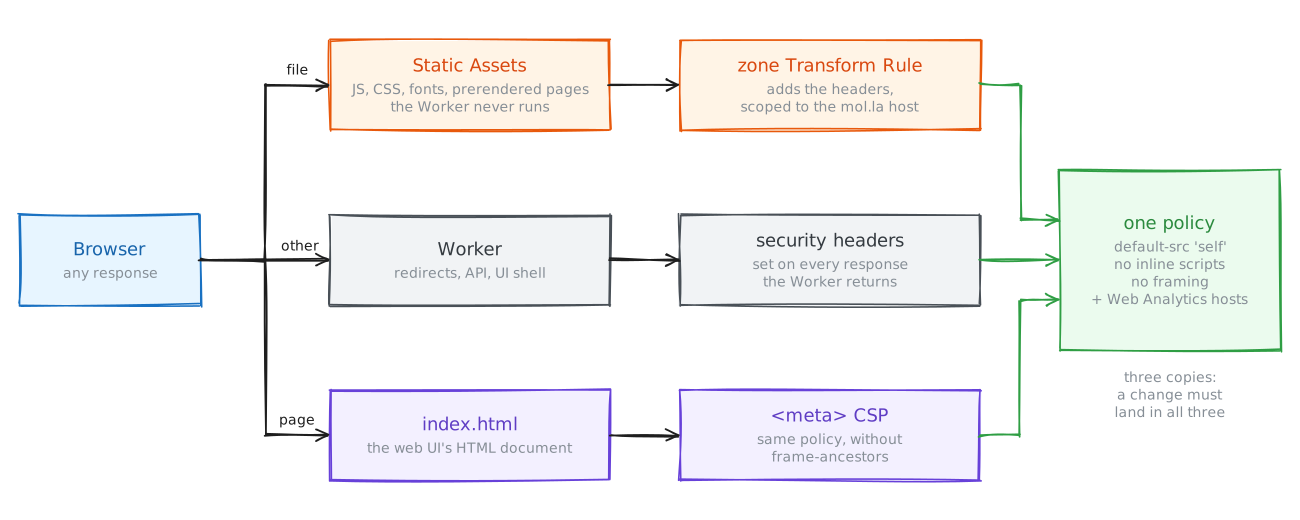
Three copies drift, and two changes showed how. Cloudflare adds its Web Analytics beacon at the edge, and the strict policy blocked it. The fix had to allow the same two hosts in all three copies. Later, frame-ancestors was removed from the <meta> copy only. Browsers ignore it in a meta tag and log a warning on every page. The header copies still block framing.
Bot protection is turned off in Terraform for the same reason: its injected script would break the policy. In development, a Vite plugin swaps the meta tag for a looser one that allows inline scripts and the dev server’s WebSocket. The production build never sees it.
Challenge 3: the first deploy, backups and failure
How does an empty account become a running service, and what happens when part of it fails?
CI can only deploy what already exists, so the first deploy is done once, by hand, from a workstation:
- An account-owned API token, limited to the permission groups the deploy needs: Workers scripts and routes, D1, DNS, zone settings, WAF, Transform Rules, redirect rules and cache purge.
- An R2 bucket for Terraform state, with its own R2 key that can reach only that bucket.
terraform applyfor the zone.wrangler d1 create, then the new database ID goes intowrangler.jsonc.- Secrets with
wrangler secret put: the permutation key (32 or more random bytes), and an optional purge token that can only purge cache. make worker-deploy, which applies the D1 migrations and deploys the Worker to themol.la/*route.- A smoke test: the web UI loads, a create returns 201, and the new code returns 302.
After that, the GitHub Environments get their tokens, and every later deploy is a tag.
Backups. D1 Time Travel keeps 7 days of point-in-time history on the free plan, and 30 days on Workers Paid, with no setup. A mistake found after a week cannot be rolled back. A restore is in place and immediate, so the runbook says to note the current bookmark first. That makes it possible to roll forward again if the restore point was wrong.
Regional failure. Workers run in every Cloudflare location, but D1 has one primary. If it fails, redirects already in a data center’s cache keep working for up to 60 seconds. Everything else returns 503. There is no automatic failover, and the runbook does not claim one.
Challenge 4: what only production showed
Which bugs did the tests miss?
Every one of these passed the test suite and failed on a staging hostname before launch, or in production:
| Symptom | Cause | Fix |
|---|---|---|
| Deep links in the web UI broke | The assets layer answers /app/index.html with a 307 to /app/ |
Ask for the directory form |
| Deleted links stayed in browsers | The zone’s 4-hour Browser Cache TTL overrode max-age=5 (Part 2) |
browser_cache_ttl = 0 |
| Another app on the zone broke | The security-headers rule matched true, so the strict CSP reached id.mol.la |
Scope every rule to http.host eq "mol.la" |
| Analytics was blocked | The edge-injected beacon was not in the CSP | Allow its two hosts in all three copies |
Two configuration lessons came with them. The Page Rules API rejects account-owned tokens, so the www redirect became a redirect rule. A zone has one ruleset per phase, so each new rule must join the existing ruleset.
Challenge 5: built for agents too
How does a script or an LLM agent learn to use the API?
A URL shortener is a natural tool for agents, so the API describes itself:
| File | Purpose |
|---|---|
/openapi.json |
OpenAPI 3.1 contract. A test fails if it drifts from the handlers |
/llms.txt |
A short guide for language models |
/.well-known/api-catalog |
RFC 9727 link set that points to the contract |
/.well-known/security.txt |
RFC 9116 contact file. Its expiry date must be renewed every year |
robots.txt, sitemap.xml |
Crawlers stay off short links, where every request is a click |
Every API response carries a Link header with rel="service-desc" that points to the contract. Every error has the same shape, {error, message, docs_url}, and a 429 carries Retry-After. The About, Developers, Privacy and Terms pages are prerendered HTML, so an agent can read them without running JavaScript.
On a free plan, where these files live matters. Most are static files, served without the Worker and without using quota. Only the two /.well-known/ documents are generated by the Worker, because they include the site’s own origin. They are cached for an hour.
Challenge 6: watching a hard limit
How do you know you are close to the edge?
The free plan fails closed, so the signal must come before the limit:
- A Cloudflare notification for Workers usage approaching its limit.
- Workers Logs with structured JSON, 200,000 events a day, kept for 3 days. Every failed click count and failed lookup logs one line.
- Database size. One D1 database holds up to 500 MB on the free plan. The daily cron removes expired links and replay records, but click counters for removed links are never deleted, so that table only grows.
- The upgrade trigger: about 70,000 requests or 70,000 rows written in a day. At that point the $5 Workers Paid plan replaces the hard stop with per-use billing.
On Paid, the first 10 million requests and 50 million rows written each month are included. After that, it is $0.30 per million requests and $1 per million rows written. The code does not change.
Lessons
What would I tell someone moving a small service to a free plan?
- Pick services with no fixed cost. At small scale, anything billed by the hour is most of the bill.
- Turn each quota into a cost per action. A table of requests, rows read and rows written for every action showed the real limit. It was writes, not reads.
- Measure the database’s counting, not the docs’ summary. Index entries tripled the cost of a create. A one-minute local test found it.
- Short cache lifetimes are a correctness tool. A 60-second cache needs no tombstones, versioned records or stale-serving rules. The guarantees are weaker, and they are written down.
- Pin what must never change. Fixed test vectors make sure a refactor cannot map old IDs to new codes.
- Know every path a response can take. Static files skip the Worker, so headers set only in the Worker miss them.
- A free plan turns a traffic spike into an outage, not a bill. For a hobby project that is the right trade. Know the trigger at which it stops being the right trade.
mol.la now serves the same links with the same codes, on a platform that costs nothing until it is worth paying for.