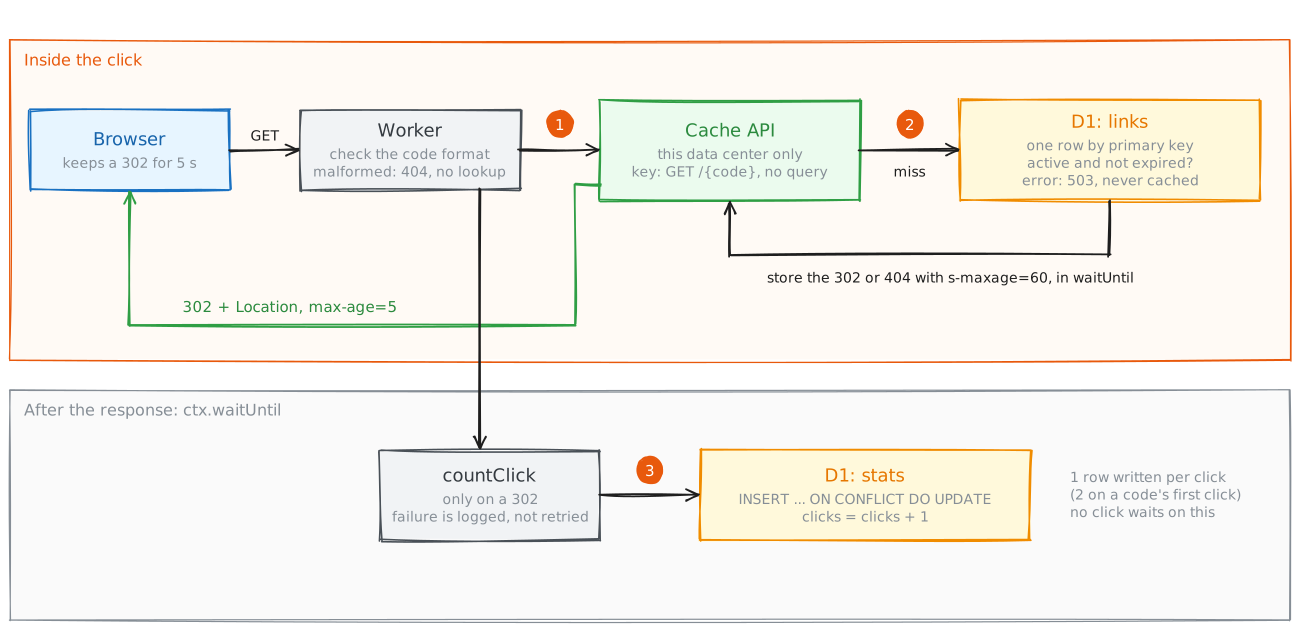
TL;DR: A click on mol.la is answered by the first of three places that has it: the browser for 5 seconds, the Cache API in that Cloudflare data center for 60 seconds, then D1. The click is counted after the response, with one D1 upsert, on cache hits and misses alike.
- The Cache API, not Workers Cache. With Workers Cache, a cache hit never runs the Worker, so the click could not be counted. The Cache API keeps the Worker in the path.
- Two lifetimes in one response. The stored copy says
s-maxage=60for the edge. The browser only ever seesmax-age=5. - Short lifetimes instead of a versioned cache. Nothing is cached for longer than 60 seconds, so removing a link needs no cache versions or tombstones. The worst case is bounded by time.
- Some guarantees are relaxed. A 404 is cached, and an expired link can redirect for up to a minute. Both are accepted trade-offs.
The handler
What happens inside one click?
The Worker matches /{code} for GET and HEAD. The code is checked against the alias rule first: 3 to 32 characters from letters, digits, hyphen and underscore. Anything else is a 404 with no-store before any lookup. Then:
const cached = await deps.cache.match(cacheKey)
if (cached !== undefined) {
  if (cached.status === 302) ctx.waitUntil(countClick(deps.stats, code, now))
  const out = new Response(null, cached)
  out.headers.set('Cache-Control', BROWSER_CACHE)      // 'public, max-age=5'
  return out
}
const link = await deps.store.get(code)                 // one row, by primary key
const decision = decideRedirect(link, now)              // active and not expired?
// 302 with Location, or 404. A D1 error returns 503 with no-store.
const stored = new Response(null, response)
stored.headers.set('Cache-Control', `${BROWSER_CACHE}, s-maxage=${EDGE_TTL_SECONDS}`)
ctx.waitUntil(deps.cache.put(cacheKey, stored))
return response
The cache key is the code alone. The query string is removed and the method is set to GET, so /abc?utm=x and HEAD /abc share one entry. decideRedirect is a pure function from the core: a link is found only if it is active and now is before expires_at.
Challenge 1: a cache that lets the Worker run
Why the Cache API and not Workers Cache or a CDN rule?
Cloudflare offers three ways to cache a Worker’s response:
| Option | On a hit | Problem for mol.la |
|---|---|---|
| Zone cache rules | No hit at all | The zone cache does not store a response the Worker generates itself |
| Workers Cache | The Worker does not run | No code runs on a hit, so the click is lost. The hit is still billed as a request |
| Cache API (chosen) | The Worker runs, reads the cache, answers | One request per hit, but the Worker can count the click |
The Cache API is the only option in which my code runs on every click. It costs one Worker request per hit, which Workers Cache also does. It saves D1 reads, not requests.
The Cache API has two properties a CDN does not. It is per data center: a put in Amsterdam does not exist in Frankfurt. It also does not use tiered caching. Each data center fills its own copy on its first miss. A popular code clicked in 50 data centers costs up to 50 D1 reads a minute, not one. With 5 million free rows read a day, that is fine. Reads were never the limit; writes were.
Challenge 2: two lifetimes in one response
Why does the stored copy say 60 seconds and the browser copy 5?
The two caches have different jobs.
- The browser cannot be reached once it has a copy. Whatever lifetime it gets is how long a deleted link can stay live for that user. So it gets 5 seconds.
- The edge can be cleared. It is there to protect D1, and 60 seconds means one D1 read per code per data center per minute at most.
So the response stored in the cache says public, max-age=5, s-maxage=60. s-maxage applies only to shared caches such as the edge. On a hit, the Worker builds a new response and sets Cache-Control back to max-age=5. The first version returned the stored copy as it was, which sent s-maxage to the client. A proxy between the user and Cloudflare could then keep the redirect for a minute.
A zone setting broke this too. Cloudflare’s default Browser Cache TTL on the zone is 4 hours, and it can override the max-age a Worker sets. On a staging hostname before launch, a removed link stayed in the browser for hours. The fix was one line of Terraform: browser_cache_ttl = 0, which means “respect the existing headers”. Part 4 has more bugs that only production showed.
Challenge 3: removing a link without a versioned cache
How do you keep a removed link dead without versions or tombstones?
A long-lived cache needs extra machinery to stay correct. If entries live for hours, a late cache write can undo a delete. Then every entry needs a version, every write must compare versions, and removed links must be cached as tombstones.
mol.la avoids all of that by keeping lifetimes short. The longest anything is cached is 60 seconds at the edge plus 5 seconds in the browser. Removing a link does three things in order:
- Soft delete in D1 with a version check:
UPDATE ... SET is_active = 0, version = version + 1 ... WHERE is_active = 1 AND version = ?. From this moment, every cache miss answers 404. - Delete the cache entry in the data center that served the request.
- Purge the URL across the zone through the Cloudflare API, if a purge token is configured. It is optional: without it, the 60-second edge lifetime bounds how long other data centers serve the link.
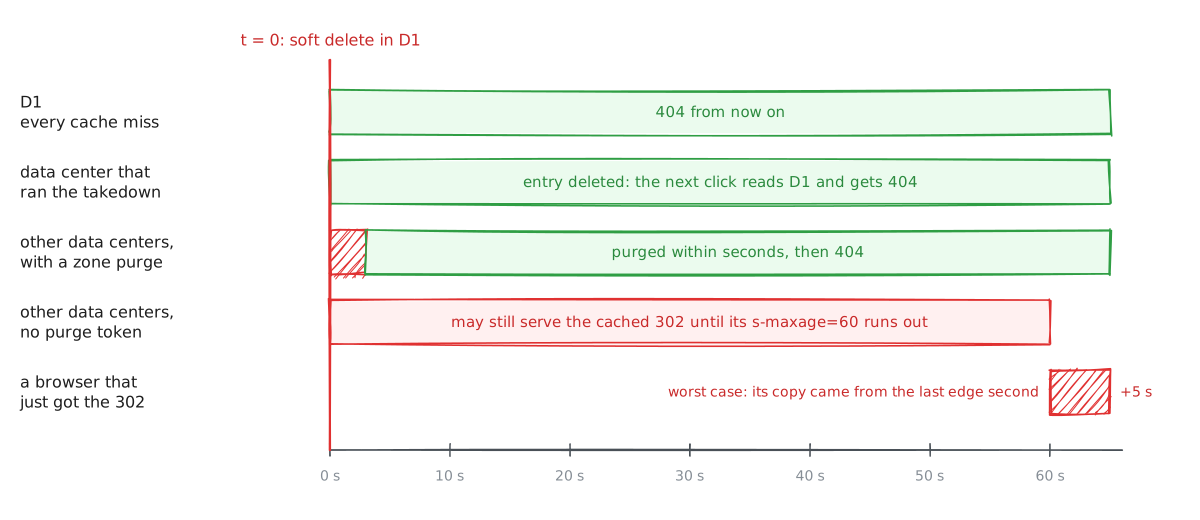
The worst case does not depend on steps 2 and 3 working: 60 seconds at the edge plus 5 in the browser. One race remains. A redirect that read the active row just before the soft delete can store a 302 just after it. That entry lives its full 60 seconds. The time limit, not a version check, bounds it.
Challenge 4: what is cached, and what that breaks
Which guarantees does a 60-second cache relax?
Three guarantees matter for a redirect. Here is what holds for each:
| Guarantee | What holds |
|---|---|
| A removed link stops redirecting | Within 60 s at the edge without a purge, plus 5 s in the browser |
| A new link works at once | Not always: a 404 is cached for 60 s in the data center that served it |
| An expired link is not served | A cached 302 can outlive expires_at by up to 60 s |
The second row is the one users can notice. If someone tries mol.la/launch, gets a 404, and then creates the alias launch, that data center can keep answering 404 for up to a minute. Caching 404s protects D1 from scanning, but scanning is already cheap: malformed codes never reach D1, and a well-formed miss costs at most one row read. Capping the edge lifetime at the link’s remaining life, and not caching 404s, would both be small changes.
A D1 failure is never cached. It returns 503 with no-store, so the next click tries again. Cached redirects keep working during a D1 outage for whatever is left of their 60 seconds. There is no stale fallback beyond that.
Challenge 5: counting the click
How do you write to a database on every click without slowing the click?
async function countClick(stats: StatsStore, code: string, now: number) {
  try {
    await stats.increment(code, 1, now)
  } catch (err) {
    console.error('click count failed', { short_code: code, error: String(err) })
  }
}
increment is one statement:
INSERT INTO stats (short_code, clicks, last_click_at) VALUES (?, 1, ?)
ON CONFLICT (short_code) DO UPDATE
  SET clicks = clicks + excluded.clicks,
      last_click_at = max(last_click_at, excluded.last_click_at)
It runs inside ctx.waitUntil, which lets the Worker keep running after the response is sent. The response does not wait for the write. The runtime keeps the isolate alive until the write settles. Without waitUntil, the write would have to finish before the response, and every click would wait for D1.
Counts are approximate. A failed write is logged and not retried. A click served from the browser cache never reaches the Worker. The architecture review lists the counts as an accepted risk: fine for a stats page, not fit for billing.
Every click is also a D1 write, so anything that requests short links uses the write quota. robots.txt blocks every path except the site’s own pages and discovery files.
What’s next
Part 3 follows a link from creation. It covers how a short code is made from a leased block and a keyed permutation in WebCrypto, how a link and its idempotency key are written in one D1 batch, and how a public API with no accounts is protected when the limit is a daily quota, not a bill.