TL;DR: A national certification exam had 20,700 seats across five levels. When registration opened, far more people tried to book than there were seats. The previous system crashed under that load. It also sold the same seat twice. The new design follows three rules. First, one atomic Redis script decides who gets a seat. (Atomic means the whole check-and-count runs as one step that nothing can interrupt.) No database takes part in that decision. Second, the request path does only three things: admit the booking in Redis, create a payment, and put a record on a queue. Everything else happens later, in the background. Third, everything that can be a static file is served from the edge (the CDN, close to the user). CloudFront, S3 and an AWS WAF web ACL handled about three out of four requests without touching a server. We sized the API fleet from load tests and added servers before the event. We did not use autoscaling. In the first hour it served 1.5M+ requests at the origin, peaked at 54.8K requests per minute, kept median latency under 10 ms, returned a server error on fewer than 0.01% of requests, and sold every seat with zero double bookings.
This is Part 1 of a three-part series. It is written as a design reference: the challenges, the options we compared, and why we chose what we chose.
- Part 1 (this post): the problem, the architecture, the edge, and capacity.
- Part 2: never selling a seat twice, covering the admission script, retries, and failover.
- Part 3: holds, payments, and the slow path, covering the hold lifecycle, payment signals we cannot trust, and durable storage that runs in the background.
The problem
What made this hard?
The work itself looks simple: a form with a candidate code, an email address and an exam level, then a payment. The traffic pattern is what makes it hard. Registration opens at an announced minute, so almost everyone arrives in the same few seconds. They keep refreshing the page until they get a seat or the seats run out. The previous system crashed at exactly that moment. It also sold some seats twice. The client’s requirement was simple and direct: stay up, and never book a seat twice.
Written out as requirements:
| Requirement | Detail |
|---|---|
| Hard caps | A cap (a maximum) per level, for five levels, and a global cap of 20,700. Never exceeded, not even by one seat. |
| One booking per candidate | A candidate code can hold at most one live booking. |
| Eligible candidates only | The code must be on an allowlist loaded in advance, and the email must match the one we have stored for that code. |
| Pay to keep the seat | A seat is held for 10 minutes while the candidate pays through the payment gateway. If the payment is not completed, the seat returns to the pool of free seats. |
| Money-safe | Nobody is charged for a seat they did not get, and nobody who paid loses their seat. |
| Available under the burst | The page must load and answer quickly, even when everyone arrives at once. |
| First come, first served | No lottery. Whoever is admitted first gets the seat. |
“Never exceed the cap” and “one booking per candidate” are the two rules that define correctness. Part 2 is entirely about them. The rest of this post is about surviving the burst while keeping those rules true.
The shape of the load
What does a flash sale look like in the traffic numbers?
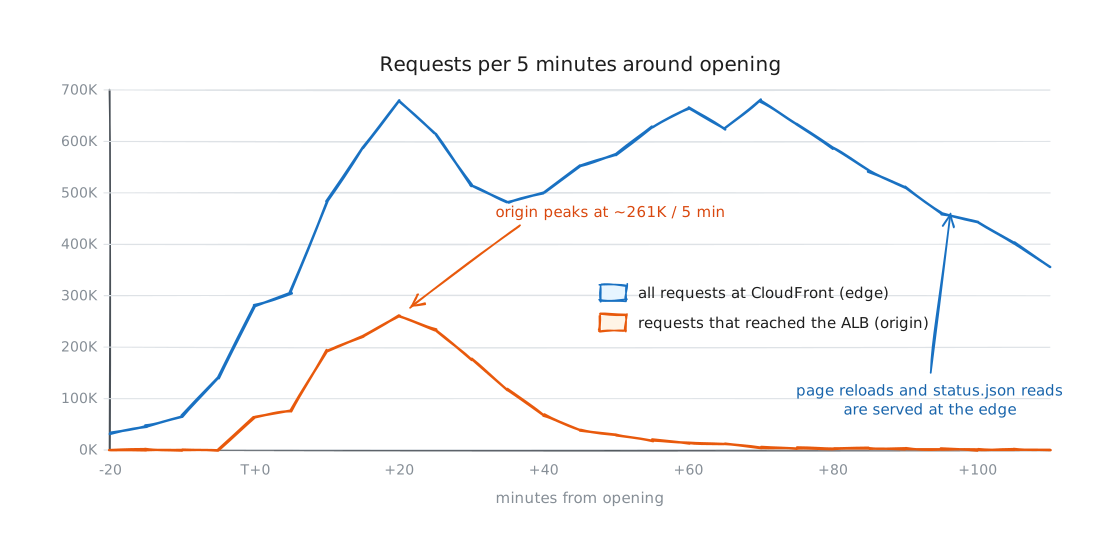
Figure 1 shows the real traffic around opening time, grouped into five-minute buckets from CloudWatch.
Three things stand out, and each one shaped the design:
- The ramp is a cliff. In other words, traffic does not grow slowly; it jumps almost straight up. Origin traffic went from near zero to about 12K requests per minute in the first five minutes after opening, and to more than 50K per minute within twenty minutes. Anything that reacts to load, such as an Auto Scaling policy, a function with a cold start, or a database that scales its capacity, reacts too late. The moment that matters has already passed.
- Most requests are not bookings. People reload the page and check availability long before and long after they submit the form. In the first hour CloudFront saw about 6.2M requests. Only about 1.5M of them reached the servers. Every request the edge answers is one that the booking path never has to handle.
- Most of the origin traffic is rejections. Once seats run low, most
/bookcalls end with a fast “no”: duplicate, level full, or closed. A rejection must cost almost nothing, because there are far more rejections than admissions.
Challenge 1: where do we decide who gets a seat?
What is the single hardest decision in this system?
Every booking asks the same question: is there still a seat at this level, and has this person already booked one? Thousands of requests ask it at the same instant. The answer must be exactly right for every one of them. Whatever component answers that question is the bottleneck of the whole system, so we chose it first.
We considered four options.
| Option | How it works | Why not (or why) |
|---|---|---|
| A. Relational database row lock | SELECT ... FOR UPDATE on a seats_left row, then insert the booking | Correct, but every booking must wait its turn on one row. Lock waits build up, connection pools run empty, and everything times out at the same time. This is the classic failure of older systems of this kind. |
| B. DynamoDB conditional counters | UpdateItem with seats_left > 0 on a counter item, plus a transaction for the duplicate check | Correct and serverless, but a single counter item is a hot key (one item that every request writes to). One partition limits how many writes per second it can take. Adding a duplicate check means a transaction on every attempt, and even a rejection still costs a write. |
| C. Virtual waiting room | Put everyone in a queue and let people in at a fixed rate | Protects the backend, but it is a whole product to build or buy. Users wait for minutes, and you still need an atomic counter at the end of the queue. |
| D. One atomic script in Redis | A Lua script checks for a duplicate, checks the level cap and the global cap, and records the admission, all in one call | Redis runs a script from start to finish before it runs anything else, so no lock is held while waiting on the network. It costs one round trip of microseconds, and a rejection is only a read. The open questions, durability and failover, are answered in Part 2. |
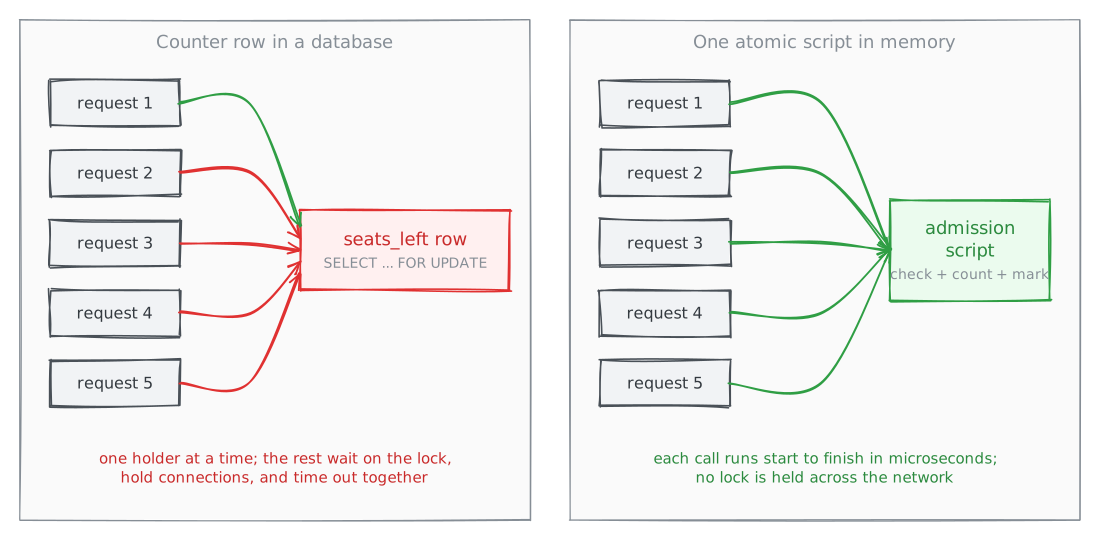
We chose D. The deciding argument was this: Redis runs commands on a single thread, and that single thread is the lock. It is held only for the microseconds a script runs, never for a network round trip. The same property makes rejections nearly free. That matters because most of the traffic is rejections.
The cost is that the source of truth for “who has a seat” now lives in memory. That creates three problems that Part 2 has to solve: a reply lost on the network, a process crash between steps, and a failover that loses the last few writes. We accepted those problems with open eyes. The other options had problems we could not solve within a single burst.
We also chose the smallest possible Redis setup: one shard (cluster mode disabled), one primary and one replica in different Availability Zones, with automatic failover. The script touches several keys at once. On one shard, that needs no extra work to keep the keys together (no hash tags). As Figure 4 shows later, a single cache.r6g.large primary never went above 10% engine CPU.
Challenge 2: keep the hot path short
What exactly happens inside a booking request?
The previous system did all its real work inside the request. It wrote the booking to the database, sent the email and updated the counters, all while the user waited. Under a burst, each of those steps becomes a waiting line, and the slowest one sets the latency for everyone.
We split the work into a hot path (the steps the user waits for) and a slow path (the steps that run after the response is sent).
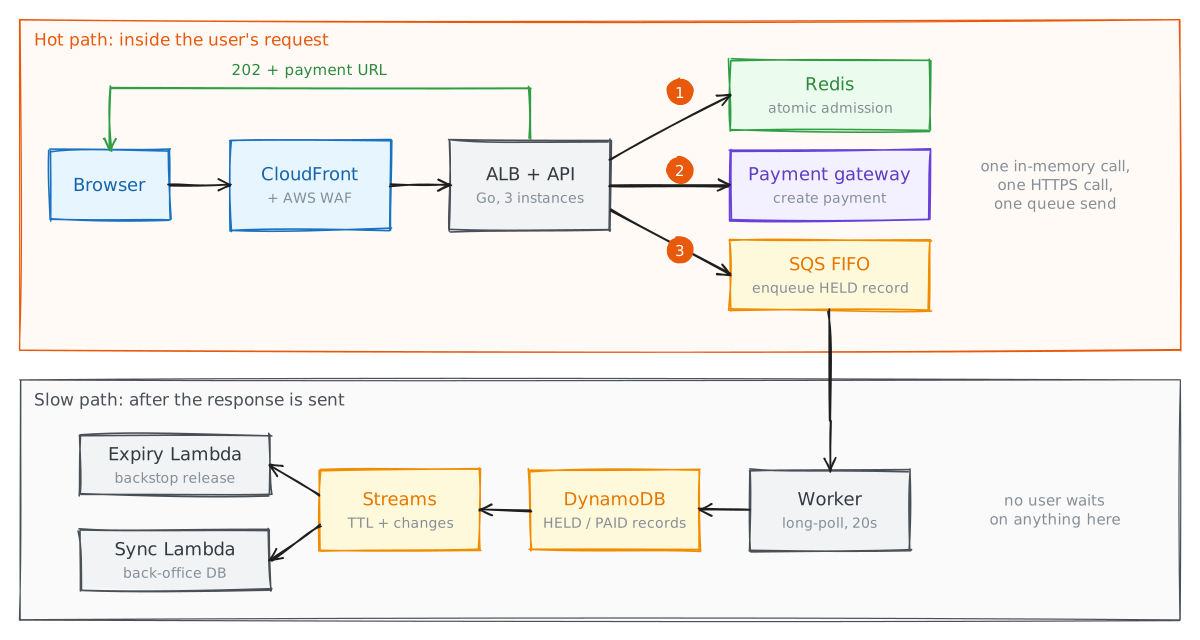
On the hot path, POST /book does exactly three things:
- Admit the booking in Redis with the atomic script.
- Create a payment with the payment gateway and get back a payment URL.
- Enqueue a
HELDrecord, which means send it to an SQS FIFO queue.
It then returns 202 Accepted with the payment URL, and the browser redirects to the gateway. If step 2 or step 3 fails, the API undoes the admission before it responds. A failure never leaks a seat (leaves a seat counted with nobody holding it).
The database is deliberately missing from this list. A worker reads the queue and writes the records into DynamoDB a few seconds later. Payment confirmations, expiry, emails and the back-office sync all run on the slow path. Part 3 covers that path in detail, including why it is safe for the database to be a few seconds behind the seat count.
The payment gateway call is the one dependency on the hot path that we do not control. It is the only reason the hot path is not a pure in-memory operation. It is also the only slow step, and it shows in the slowest requests: p99 latency was 4.1 s in the first five minutes, when every admitted user was creating a payment at the same time. After that it settled to about 0.3 s. The median stayed at 2 to 5 ms the whole time, because most requests were fast rejections that never reached the gateway. Placing the gateway call after admission is what makes this work: rejected requests never wait for it.
Challenge 3: keep traffic off the servers
How do you make three out of four requests never reach your code?
The cheapest request is the one your servers never see. We put everything we could behind CloudFront.
- The page itself is a static HTML file in a private S3 bucket, served through CloudFront with Origin Access Control. Page loads never touch a server.
- Availability counts (seats left per level, and whether booking is open or closed) are a small
status.jsondocument in the same bucket. The API rewrites it as the counts change. The browser reads it once when the page loads. After that, the page reacts to API responses instead of asking the server again and again. A429 closeddisables the form, and a409 level fulldisables that level. CloudFront serves the file with caching disabled, so readers always see the latest version. The load still lands on S3, not on our servers. - One origin, one hostname. CloudFront routes
/book,/payment/callback,/payment/webhookand/healthto the Application Load Balancer, and everything else to S3. The page and the API share one hostname, so the browser sends no CORS preflight (an extra request the browser sends first when the page and the API are on different hosts). Under a burst, skipping the preflight removes a whole extra request from every booking.
In front of all of this sits an AWS WAF web ACL attached to the CloudFront distribution. It checks every request at the edge before CloudFront forwards anything.
| Rule | Purpose |
|---|---|
Rate limit on /book, 2,000 requests per 5 minutes per IP | Stops a single client from flooding the booking endpoint |
Rate limit on /payment/callback, 100 per 5 minutes per IP | Makes it impractical to guess payment IDs |
| AWS managed IP reputation list and known-bad-inputs rules | Drops known attackers and exploit payloads at low cost |
Body size limit on /book | The form is tiny, so a large request body is never legitimate |
The per-IP limits are deliberately generous. Mobile carriers in the region use carrier-grade NAT, which puts many subscribers behind a small number of shared public IPs. A strict per-IP limit would have blocked whole neighbourhoods of real candidates. The rate rules exist to stop abuse, not to control traffic. The admission script already rejects excess load cheaply on its own.
The load balancer accepts traffic only from CloudFront. Its security group allows CloudFront’s origin-facing IP ranges and nothing else. But that list covers every CloudFront distribution in AWS. An attacker could create their own distribution, point it at our load balancer, and bypass our web ACL. So CloudFront also adds a secret header to every request it sends to the origin. The ALB listener forwards only requests that carry that header. Its default action is a fixed 403. CloudFront talks to the ALB over HTTPS, so the secret never crosses the internet in clear text.
Challenge 4: capacity for a cliff
Why pre-scale instead of autoscale?
We considered three compute options.
| Option | Why not (or why) |
|---|---|
| EC2 Auto Scaling with target tracking | Scaling reacts to metrics that are a minute or more behind, then waits for new instances to boot and pass health checks. By the time new capacity arrives, the jump in Figure 1 is already over. |
| AWS Lambda behind API Gateway | Scales fast, but the burst hits concurrency ramp limits and cold starts at exactly the wrong moment. Every new execution environment also opens its own Redis connections. A traffic spike then becomes a flood of new connections to the one component that must not stall. |
| A fixed, pre-scaled fleet | Simple and predictable. Size it from load tests, add instances hours before opening, and remove them afterwards. |
We pre-scaled a fixed fleet: three instances, one per Availability Zone, behind an Application Load Balancer. Each instance ran the API and the queue worker as two systemd services, with a fixed Redis connection pool (300 connections per instance, enough that the burst never waits for a connection). The instances live in private subnets with no public IPs. They reach the payment gateway and the email provider through a NAT gateway in each Availability Zone, and they reach AWS APIs through VPC endpoints. Operators use AWS Systems Manager Session Manager, not SSH.
We chose the size from load tests before launch. The setup was a k6 load generator in the same region, an allowlist pre-loaded with 40,000 test candidate codes (about double the real seat count), and a mock payment gateway with adjustable latency. The mock let us practise the full booking path at full rate without hitting the real gateway’s limits. The tests also shaped several details you will see in Parts 2 and 3.
On the day, the fleet had far more capacity than it needed.
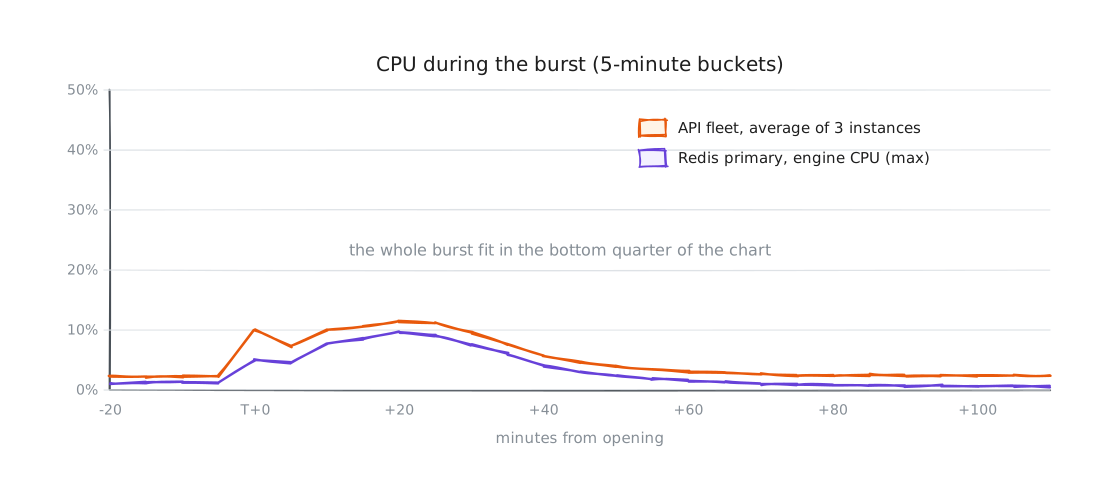
We sized it that way on purpose. The extra capacity cost a few dollars an hour for a few hours. An outage at opening would have cost the client the whole event. With these numbers, the next run could use two Graviton instances and a smaller Redis node and still use less than a third of their capacity at the peak.
The whole architecture
What does it look like end to end?
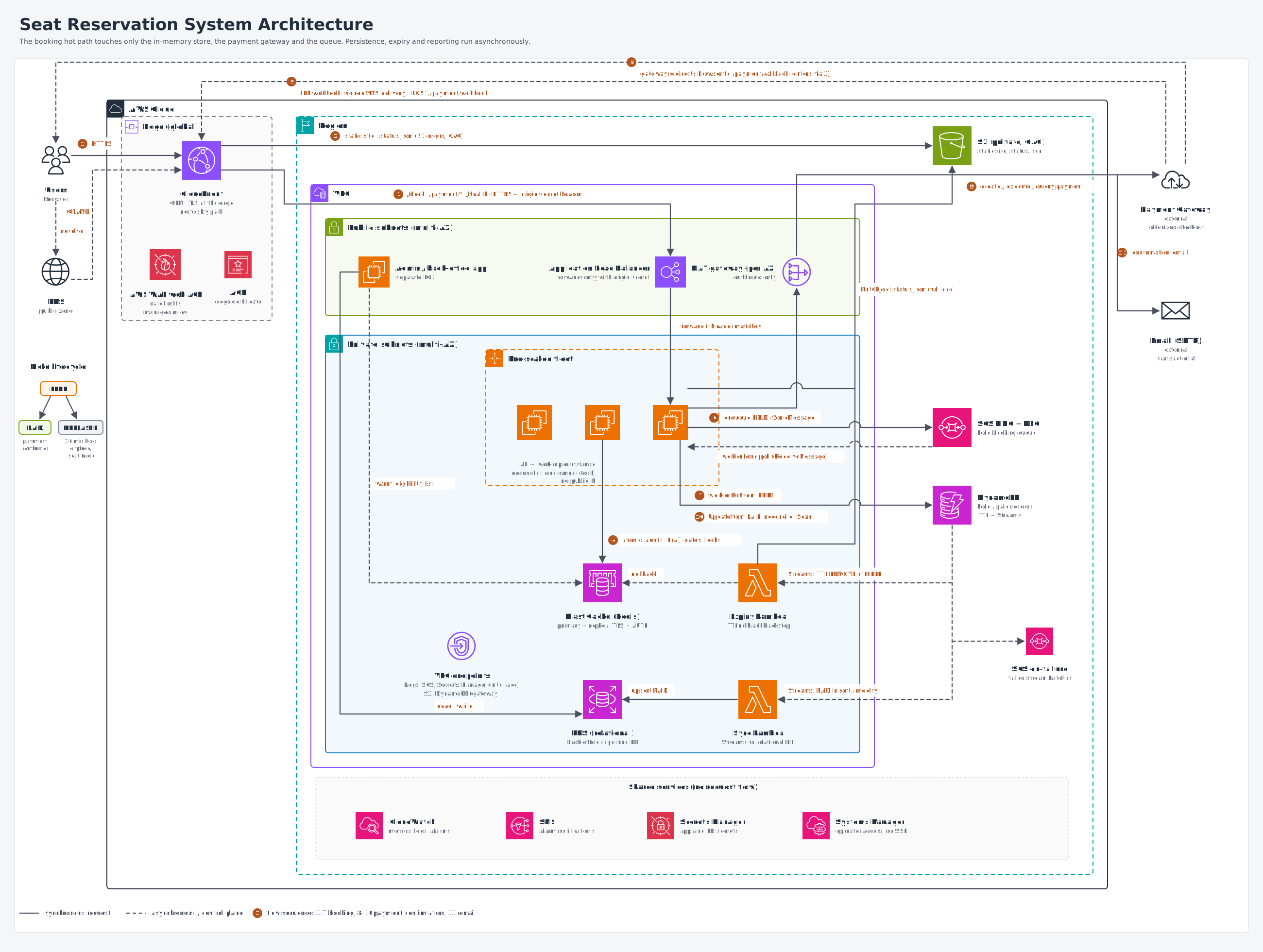
Figure 5: The full architecture. CloudFront and the AWS WAF web ACL at the edge; an ALB and a pre-scaled API fleet in private subnets; Redis for admission; SQS FIFO, DynamoDB and Lambda for the slow path. Open full-size diagram
A booking moves through it like this:
- The browser loads the page and
status.jsonfrom CloudFront, which serves both from a private S3 bucket. The AWS WAF web ACL on the distribution checks every request. - The browser posts to
/book. CloudFront forwards the request over HTTPS, with the origin secret header, to the ALB in the public subnets. - An API instance in a private subnet checks the gates (is booking open, is the code valid) and runs the admission script on ElastiCache for Redis (primary plus replica across two AZs, TLS and AUTH enabled).
- If admitted, the API creates a payment with the payment gateway (outbound through the NAT gateway) and enqueues a
HELDrecord on SQS FIFO. It returns the payment URL. - The worker on each instance long-polls the queue. (Long-polling means it keeps a request open and waits for messages instead of asking again and again.) It writes the record to DynamoDB with a conditional put. (A conditional put is a write that succeeds only if a condition is true, here that the record does not exist yet.)
- The user pays at the gateway, and the gateway redirects the browser to
/payment/callback. The gateway also sends a signed webhook to/payment/webhook. Either one can mark the bookingPAID. The API then sends a confirmation email. - A reconciler (a background loop inside the API fleet, with only one instance running it at a time) releases holds that were not paid in time. DynamoDB TTL (time to live: DynamoDB deletes a record some time after its deadline passes) and DynamoDB Streams drive an expiry Lambda that acts as a safety net.
- A second stream consumer, the sync Lambda, copies paid bookings into an RDS database for the back-office app. The back-office app also loads the candidate allowlist into Redis before opening.
CloudWatch alarms cover the things that should wake someone up: ALB 5xx errors and unhealthy hosts, Redis CPU, memory, connections and replication lag, queue depth and the dead-letter queue, DynamoDB throttles, Lambda errors and stream iterator age. Application logs go to CloudWatch Logs, so an incident never starts with an SSH session. A few custom metrics sit next to them: admissions per minute, replica-acknowledgement failures (explained in the next post), holds past their deadline, and any difference between the Redis counters and the database.
Launch day
Did it work?
| Metric (first hour) | Result |
|---|---|
| Requests reaching the servers | 1.5M+ (about 6.2M at the edge) |
| Peak throughput at the origin | 54.8K requests per minute |
| Median latency | under 10 ms (2 to 5 ms at the ALB) |
| Requests served without a server error | 99.99% |
| Seats sold | 20,700 of 20,700, about 95% of them within the first hour |
| Double bookings or overbookings | 0 |
The number I care about most is the last one. It did not happen by accident. It is the result of the decisions in Part 2, and of months of testing, finding problems and fixing them before launch (Part 3 describes how).
What’s next
Part 2 looks inside the admission script. It covers what the script checks and in what order. It explains how the script stays correct when a reply is lost and the client library retries, and how the seat from a crashed request is returned to the pool. It also shows how we closed the short time window in which a Redis failover could silently sell the same seat twice.